Bulk SMS Verification: Designing a Controlled API Workflow
Plan repeatable SMS verification with account-level API keys, idempotent ordering, rate limits, and order-state handling.

Automation needs stronger controls
A repeatable verification workflow should authenticate every request, isolate account ownership, and use idempotency so network retries do not create duplicate orders. It also needs explicit handling for waiting, completed, cancelled, and expired states.
Recommended request flow
Check available balance, create one order with a unique idempotency key, and poll the same order at a controlled interval until a code arrives or the order expires.
- Store API keys only on the server
- Use one idempotency key per business request
- Respect documented rate limits
- Branch on error codes rather than translated messages
Billing and reconciliation
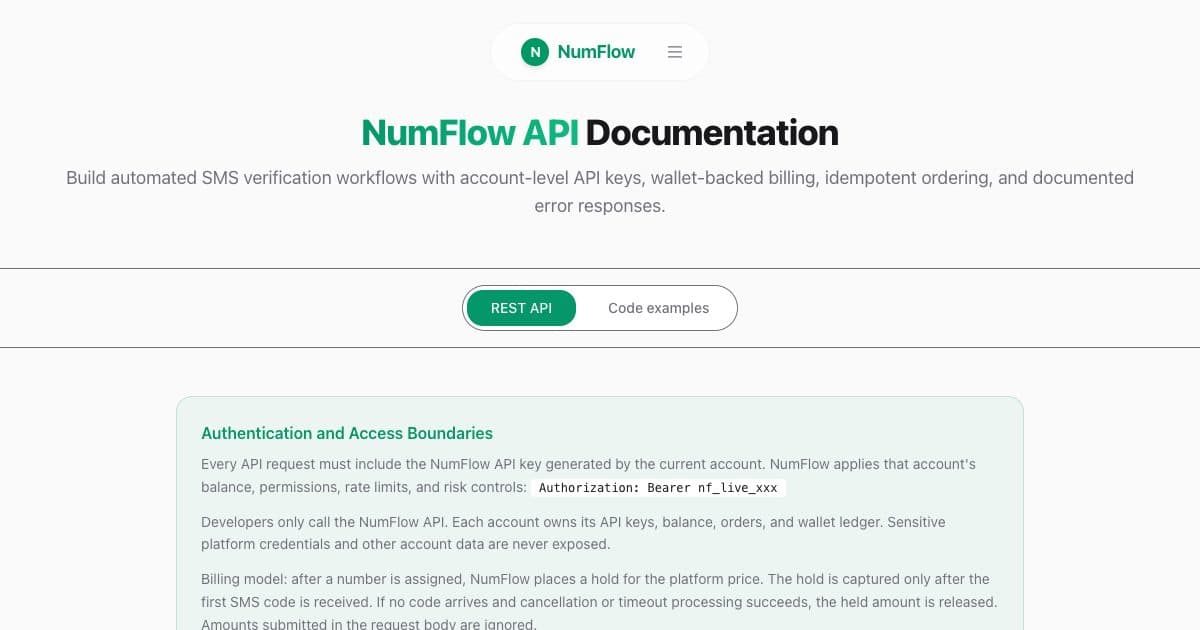
NumFlow reserves the platform price when a number is allocated and completes the charge after the first verification code is received. Eligible orders without a code release the reserved amount when cancelled or expired according to the system result.
Verification screens in context
Move from research to a current option
When researching βbulk sms verification,β do not stop at general advice. Start with the Telegram service page to confirm the exact target app, then review the France country page for number formatting, supported services, and the current price range. These pages answer different questions: the service page identifies what you are verifying, while the country page identifies where the receiving number is issued.
To inspect a combination that is currently published, use the Telegram verification page for France as a live comparison route. It keeps the service, country, and ordering choices in one context; when the article's exact pair is not published, the link does not send readers to an invented URL. Availability and prices can change, so use that page and the current pricing explanation for the final decision.
Make the verification attempt auditable
Before ordering, record the target app, country, displayed price, and request time. After a number is assigned, keep one active order and enter the full number exactly as the target app expects, including the country code when required. Track the same order until the expiry returned by the system instead of substituting a fixed waiting time. If a code arrives, use it within the target app's validity period and keep the order reference and final state for troubleshooting.
If no SMS arrives, separate four possible conditions: the target app has not sent it, the number format is wrong, the order is still waiting, or the order has expired. Choose another country or line only after the current order is cancellable or terminal. This produces a clean record for βbulk sms verificationβ and avoids duplicate orders that are hard to interpret. Temporary numbers support short verification tasks; accounts that matter over time still need a recovery method you continuously control.
Planning checklist
Use this api guide as a planning page before you create an order. The main keyword is bulk sms verification, but the operational goal is broader: choose the exact service, select a suitable country, understand the displayed platform price, and keep the verification attempt inside one traceable order.
- Confirm the target app and country before ordering.
- Keep one active order per verification task.
- Use the order expiry returned by NumFlow instead of guessing a fixed wait time.
- For API workflows, store keys on the server and send one idempotency key per business request.
Common mistakes to avoid
Most failed workflows come from treating temporary verification like a permanent mobile subscription. A short-lived number can help complete a supported verification task, but it should not be your only recovery method for an account you need to keep. Another common mistake is opening several overlapping orders while the first one is still waiting; that makes troubleshooting harder and can create confusing account records.
Recommended operating workflow
Start with a narrow intent: one target service, one country, and one account task. Review the service page before ordering, then create the order only when the price and availability are acceptable. After the number is assigned, enter it exactly as shown, including the country code when required. Keep the order page open or poll the same order through the API until the returned expiry time. If the code arrives, record the order reference for your internal audit trail. If no code arrives, follow the cancellation or timeout state instead of forcing a manual assumption.
How to judge the order result
For api tasks, use the current order state as the source of truth. Check the assigned service, country, effective receiving window, and whether the order is waiting, completed, cancellable, or expired. A previous screenshot or an earlier successful route does not prove that the same option is available now.
What to keep for future reference
Keep the order reference, selected service and country, request time, and final status for your own troubleshooting. For the topic βbulk sms verification,β these details make it easier to distinguish a delivery delay from an incorrect selection or an expired order. Do not store or share verification codes after the task is complete.
Short answers
Can this guarantee a verification code?
No. The target service controls whether it sends and accepts a code. NumFlow shows current availability and the order result.
Should I create several orders at once?
No. Use one active order per task so you can interpret status, expiry, cancellation, and billing correctly.
What should API users rely on?
Use stable response fields, documented error codes, idempotency keys, and the expiry returned by the order.
How this page connects to the rest of NumFlow
Use the links below to check current service availability, compare countries or pricing, review API behavior, or continue troubleshooting. Keep the same selected language as you move between public NumFlow pages.